During your online application, you can give your college or institution permission to retrieve information from your Department for Education (DfE) education record.
How education record sharing works
After EBS confirms that you have a DfE education record, it automatically requests a six-digit share code from the DfE View Education Record service. You do not need to start the request.
While EBS requests the code, your application displays an In progress message. When the code is available:
-
EBS displays the code in your application.
-
A five-minute countdown begins.
-
The DfE Education Record app sends you a push notification.
-
You enter the code in the app to confirm that you give permission to share your education record.
-
You return to your application and continue to the next step.
Where the share-code request appears
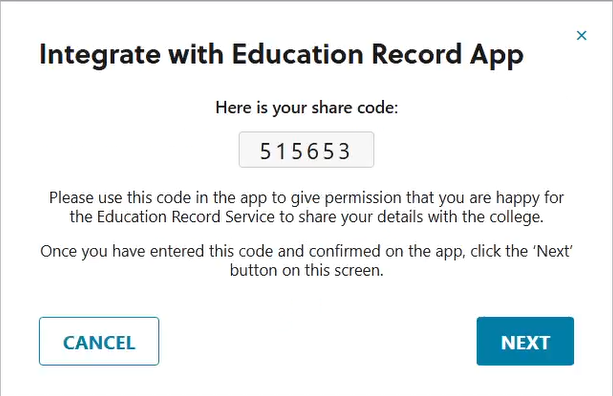
The share-code request appears automatically in your online application in Ontrack Learner Hub. It follows the check that confirms whether you have a DfE education record.
The request continues in the same pop-up as the education record check, as shown in the image below.
Share-code validity
Your share code is valid for five minutes. The share-code screen displays a countdown showing how much time remains.
If the code expires, you can request another one. There is no limit to the number of replacement codes you can request after a code expires.
If EBS cannot retrieve a code
EBS tells you if it cannot retrieve a code because the DfE service does not respond within five minutes or returns an error.
You can ask EBS to try again. You can retry an unsuccessful request up to three times. If the third retry is unsuccessful, you must cancel the request and return to your application.
The three-retry limit applies only when EBS cannot retrieve a code. It does not apply when EBS retrieves a code but the code later expires.
Continuing your application
After you enter and confirm the code in the DfE Education Record app, return to Ontrack Learner Hub and select Next.
EBS does not check whether you have confirmed the code in the app before it lets you select Next. Always confirm the code in the app before you continue.
Cancelling the request
You can cancel education record sharing while EBS is requesting a code or after it displays one.
When you select Cancel, EBS:
-
Closes the pop-up.
-
Ends the active share request.
-
Returns you to the standard application process.
You can continue your application without using the DfE education record-sharing process.